Cell Phone Cameras: Useful, Convenient, and Still Kind of Annoying
The Camera You have Available
PHOTO JOURNAL 2026
James Bradley
7/9/20269 min read
Cell Phone Cameras: Useful, Convenient, and Still Kind of Annoying
Cell Phone Cameras: Useful, Convenient, and Still Kind of Annoying
This batch of photos is a little different from most of my previous posts because all but one of them were taken with my cell phone. Most of these shots were taken with my Samsung Galaxy S20 Ultra. I know, I know, this is supposed to be a photography challenge and here I am using a phone. Surprise! Today’s cell phones can still be used for photography because they have strong cameras. While a cell phone can take great pictures, it does not (in most cases) have the control that a DSLR or mirrorless camera does. But honestly, that’s part of the point I am trying to make with this post.
The best camera is the one you actually have available when you need to get a quick shot. You know, one of those Holy $#&@ shots where you say, "God, I wish I had my camera!” Well, guess what, you do. Sometimes it's the Sony, Canon, Nikon, Fujifilm or whatever you choose to do your photography with. Sometimes it’s the nifty little gadget that almost all of us have that has the capability of taking amazing photos. Yep, you guessed it, the phone in your pocket!
This little pocket miracle we call a cell phone is a pretty phenomenal tool if used right. The cameras they have available on them now are quick, convenient, easy to carry, and almost always available. It matters. If I see something interesting, I can pull my phone out and grab the shot before the moment disappears. No lens change, no camera bag, even though there are a ton of accessories available for phone photography use. There is no panic trying to make sure your settings are right. Just point, tap, and hope for the best.
This convenience is a big deal.
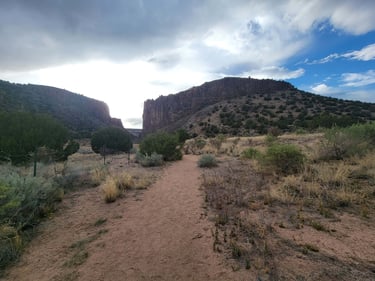
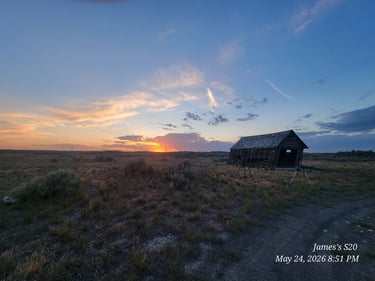
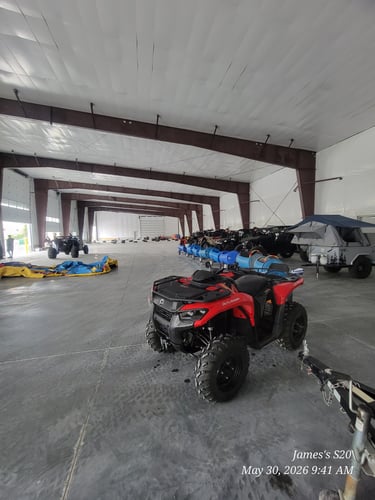
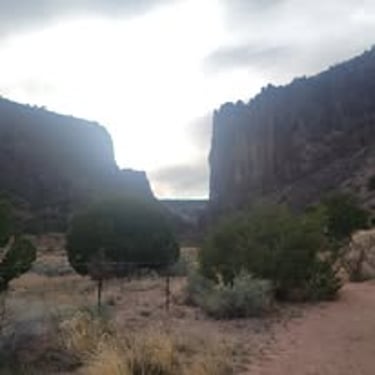
With this post I have an odd mix of subjects—a loaf of my wife’s home made blueberry-lemon sourdough bread (amazing job Susan), a raven or crow (not sure which) on a ledge in Santa Fe, a shot of a side-by-side from the SBSO customer appreciation day shoot that I had a chance to work, a cloudy and very dramatic morning sky, a sunset with an old building (in prep for a moonlight painting session), and a couple of shots from Diablo Canyon in the Santa Fe area. All but one of these are phone shots. This actually helps me see what a cell phone will do versus what a mirrorless camera will.
Blueberry-lemon loaf…yum….Um, my apologies. My stomach almost won there. The sourdough bread photo is a good example of where phones can do pretty well. Food, product-style shots, and quick indoor photos can work nicely with a phone, especially when there is decent light and a lot of the time even if the light is not decent. Cell phone photography is relatively forgiving. The colors are bright, the texture shows up well, and the phone did a pretty good job of giving the bread an, “I think I’d like to have a slice,” instead of like something from a failed science experiment.
The raven/crow (still undecided which), shot is where the limitations of the camera phone start to show. The phone was convenient, and I was able to get the photo, but the large black bird was very dark against a far brighter background. If I had taken this shot with any of my Sony cameras, I would have been able to make adjustments to the exposure. I might have gotten a better shot. That kind of high contrast is tough for any camera, but phones tend to struggle with it pretty quickly because, in most cases, they do not have any type of adjustment available to make the compensation. What you shoot is what you get. This background has a lot of light, the bird is nearly black, and the phone has to decide what it thinks is important. Sometimes it guesses right. Sometimes not so much.
The side-by-side shot from the SBSO customer appreciation day shoot was more of a preparation shot for my main camera setup. It was overcast and rainy all day that day. The building had no light in it other than the ambient light coming from the roll up doors. I wanted to see what kind of shots I could get with the phone and have a comparison to what I got with the Sonys. This is another situation where my cell phone camera is really handy. I can use it to document a location, check angles, look at available light (light comparison), remember where things are set up, or just get a quick reference before I start working with the main camera, which I ended up doing because I had more control. And, no I am not a control freak! Ask Susan, she’ll verify! The Samsung phone may not be the final “keeper” camera for every situation, but it can absolutely help me get ready for the real shoot if necessary.
Sunsets and sunrise shots are usually done fairly well with a cell phone. For whatever reason, they handle dramatic skies well, especially if the light is interesting or there are clouds or haze. Of all of the photos I have seen in the last year, my favorite one is actually one that Susan shot on the back of our property with, you guessed it, her cell phone because it is the camera she had with her.
The sunset on the old building is one of my favorite phone shots from this group. The colors, the shape of the clouds, and the silhouette of the building all work together nicely. It is one of those moments where having the phone was enough because the light was doing most of the heavy lifting and I used it because I had my Sony setup on a tripod in preparation for the lunar photos I was planning on shooting after the sun dropped and the moon was full.
With the canyon shots I see a good comparison. One of them was taken with the A6000 and my 24-70mm lens, and the lighter one was taken with my phone. That difference matters. The A6000 gave me more control and more flexibility. By using my exposure triangle (shutter/aperture/ISO) I was able to adjust the settings in camera so the light part of the sky was not totally blown out. The phone gave me convenience with a quick wide view of the scene and not having to worry about making adjustments. Both types of cameras have their place, but they do not work the same way.
Phones are great for wide panoramic shots. Capturing a trail, the cliffs, the sky, or just the general feeling of being there can be almost immediate with a phone shot. But they can also struggle with harsh light, bright skies, and deep shadows. In the lighter canyon phone shot, the sky is very bright and the foreground is darker. This is a tough scene. The phone is trying to hold detail (without having the scene all blown out), in both the bright sky and the darker landscape. Sometimes it does okay. Sometimes it gives up and says, “Good Luck with that”!
Keep this in mind with cell phone photography: the phone does a lot of processing behind the scenes, it’s sharpening, brightening, darkening, smoothing, blending, and probably a bit of guessing based on the vast amount of information coming through the lens. Sometimes that helps. Sometimes it makes the photo look a little washed out or over exposed. It’s the nature of the beast with a cell phone.
With my Sony cameras, I have more control over the final image. With the phone, I get convenience, but I give up some of that control. C’ est la vie huh?
There are apps available that can give a cell phone camera settings that are closer to what you would find on a DSLR or mirrorless camera. With some of these apps, adjustments like shutter speed, ISO, white balance, and focus become available. Some can even shoot in RAW, depending on the phone and the app.
Now, I need to be clear here. This is one of those areas where I have done way more research than actual hands-on practice. I know these apps exist, I know what they are supposed to do, and I understand why they could be useful because I do the research. What I have not done yet is spent enough time actually using one to say I understand how to use any of them.
Most cell phones shoot standard JPEG files by default. JPEGs are useful, easy to share, and for the most part require very little thinking about the exposure triangle, shot composition, or all the other variables that come with a traditional camera. The downside is that JPEGs do not hold as much editing information as RAW files. RAW gives you more room to fix jacked up highlights, wonky shadows, outrageous color, and lack of detail when editing.
The biggest downside of shooting RAW on a cell phone is file size. RAW files, in comparison to the tiny size of JPG files, are huge. They will wipe out the memory on your phone in a hurry if you are not paying attention. So, even though RAW files give you more editing flexibility, they also create another issue to manage. Apparently, photography needed one more way to fill up storage space, right?
I do have one of these apps installed on my Samsung. It's called Expert RAW and I found it with the help of ChatGPT and Google. The settings look similar to what I have with the Sony, at least in theory. In fact, other than the menu settings available in my Sonys, they look pretty close to identical. I installed it with the intent of using it as a backup option when I do not have my Sony cameras with me. It still remains to be seen whether I'll muster the ambition to try it.
The problem is, I rarely leave the house without my Sony cameras, so I have not really been forced to learn the app yet. That means the phone app is still sitting there in the “this could be useful someday” category. Maybe that will become a project later. Add it to the list.
Another big limitation with cell phones is zoom. Cell phones are fine when the subject is close or when I want a wide shot. But when I need to reach wildlife, sports, or something far away, the phone is not going to compete with my 50-400mm Tamron. Digital zoom can make the subject bigger, but it usually comes at the cost of detail and image quality (and it is huge when you zoom out). This is when the phone reminds me that it is still a phone, not a super hoody telescopic camera.
I do not think cell phone photos are “less real” photography. The camera is just a tool, be it a cell phone or digital. I think of it like this. Composition, light, timing, and subjects still matter and remain the main components, but it's what I do with them that makes the difference! If anything, shooting with the phone forces me to think differently. (I see a theme developing here) I may not have all the same settings or lens choices, so I have to work with what I have. I need to use the tools I have available.
It’s actually a good thing.
With a phone, I am usually paying attention to the scene more than the gear because I know the camera's phone settings are doing a ton of work behind the scenes while I screw around like a little kid in a toy store looking at all the new toys. Where is the light? What is the subject? Is the background a mess? Am I holding the phone straight? Do I need to tap on the subject to expose it properly? Can I move two steps left and make the photo better? These are still photography questions that need to be asked, even if the camera fits in my pocket.
The sunset with the old building is one of my favorites from this group, it has the strongest mood and composition, even if it was accidental. The phone handled the color and scene pretty well. The blueberry-lemon sourdough photo is a close second because, let’s be honest, it was amazing and good sourdough deserves respect. RIGHT?
I’m not so fond of the raven shot, not because I dislike the moment, but because it shows the limitations pretty clearly and obviously. The subject is dark, the background is bright, and the phone had a hard time giving me everything I wanted. It also maintains no resolution when I try to make the photo larger, meaning it will not hold any detail because of the low pixel count. I don’t really think it gave me anything I wanted, other than a shot of a big black bird on my balcony from 3 feet away. Still, I got the shot, and that is part of this whole exercise, right?
Cell phone cameras are super useful but not perfect. The same concept applies to traditional cameras as well. DSLR, point and shoot, and mirrorless cameras have tons of capabilities, but who (besides me) carries one of them everywhere they go? Cell phone cameras are great for convenience, quick moments, wide scenes, food, travel, documentation, scouting, and everyday practice. They really struggle with fast action, low light, heavy contrast, long-distance subjects (lots of grain), and situations where I need full control. This is why almost always have my Sony cameras within arms reach.
But I've learned that photography is not only about having the “right” camera. It is about using the camera(s) right. It's also about learning what they can and cannot do.
Sometimes that camera is a Sony.
Sometimes it is a Samsung in my pocket.
Either is good enough to keep my photography moving.
I would love to get some feedback from you all about the photography learning process. Please feel free to shoot me an email through my contact page.
Thanks for reading!